
Introduction
Efficiency is a common theme of these articles. Up to this point, the series of articles served as small, progressive learning steps. To design more complex apps in Blue, we needed to educate ourselves on basic principles such as frameworks, tokenization, large language models (LLM), and application programmable interfaces (API). Each article built on the previous article’s concepts; with the purpose of helping guide how a first time Blue user might approach building their own apps. I built the Redline Editor with the goal of providing users an efficient way of improving their writing, and subsequently, the effectiveness of their communication.
While the Redline Editor is functioning even better than initially anticipated, a handful of upgrades remain that will improve its efficiency. Prompt caching is one such efficient upgrade. Prompt caching instructs the user’s called LLM to store large amounts of context, background information, or consistent instructions, to drive down input token costs. This is especially relevant for our redline app, as the uploaded ruleset for editing can be cached and reused for multiple inputs within a set timeframe. Afterwards, a final visual polish and the editor will be ready for serious use. Let’s get into it!
Article Topic
This article completes the Redline Editor app built over a three-article series. Calling an API with a Blue AI Generated App, and Exploring the Redline Editor are the other two articles in the series. For users interested in recreating the app on their own, the prompts used for the initial buildout and subsequent app upgrades are posted in text accordions at the end of this article.
Sola’s Blue AI Pricing
The free version of Blue AI provides users 2 high-level builds and 12 standard builds weekly. For new users looking to better understand Blue as a platform, the Starter Plan (Free) is more than generous. Users receive 2x the AI Build quota in the first 7 days, and it even allows the use of API keys and backups. Visit Blue AI’s Pricing page for more information.
Debugging a Previous Error
Temperature, in the context of AI and LLMs, is the degree of randomness, or creativity, the model exercises while processing a prompt. The temperature scale measures anywhere from 0 – 2.0, with “0.7” as a widely accepted default value. While testing the Redline Editor’s upgraded build, where the app allows the user to select which AI model to call, e.g. Sonnet, Haiku, or Opus, calling Opus returned a temperature error. After some quick reading, it seems most, if not all, of Claude’s language models now prevent user-adjusted temperature settings. The implied rationale behind this change stems from constraint. As AI-inference improves, constraining the temperature output to a “0.2”, for example, stifles its adaptive thinking.
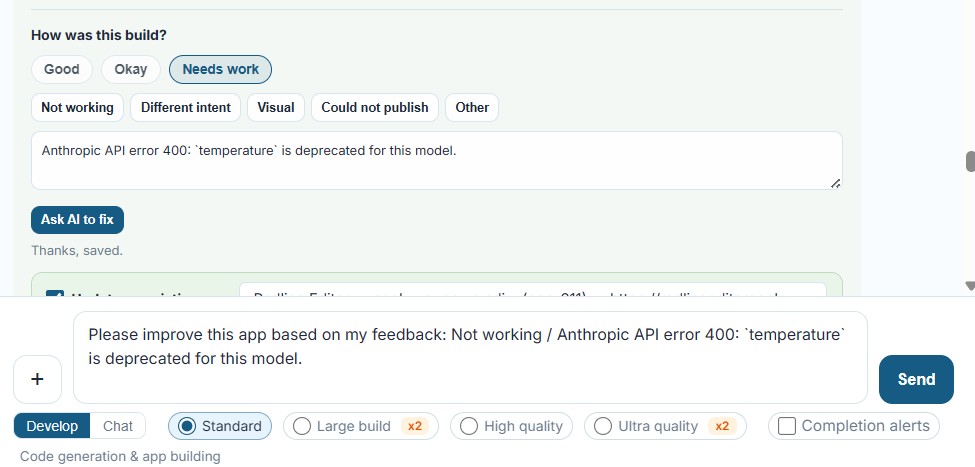
Luckily for us, after each build, Blue allows the user to request a fix if the deployed app is not functioning. To debug the app, I copied and pasted the Anthropic API error 400: ‘temperature’ is deprecated for this model error message into Blue’s How was this build? box. Clicking Needs work, not working, then finally the Ask AI to fix button, pre-filled Blue’s prompt box. The code debug took less than two minutes; and after redeploying the app, the error was resolved.
Permitting Prompt Caching
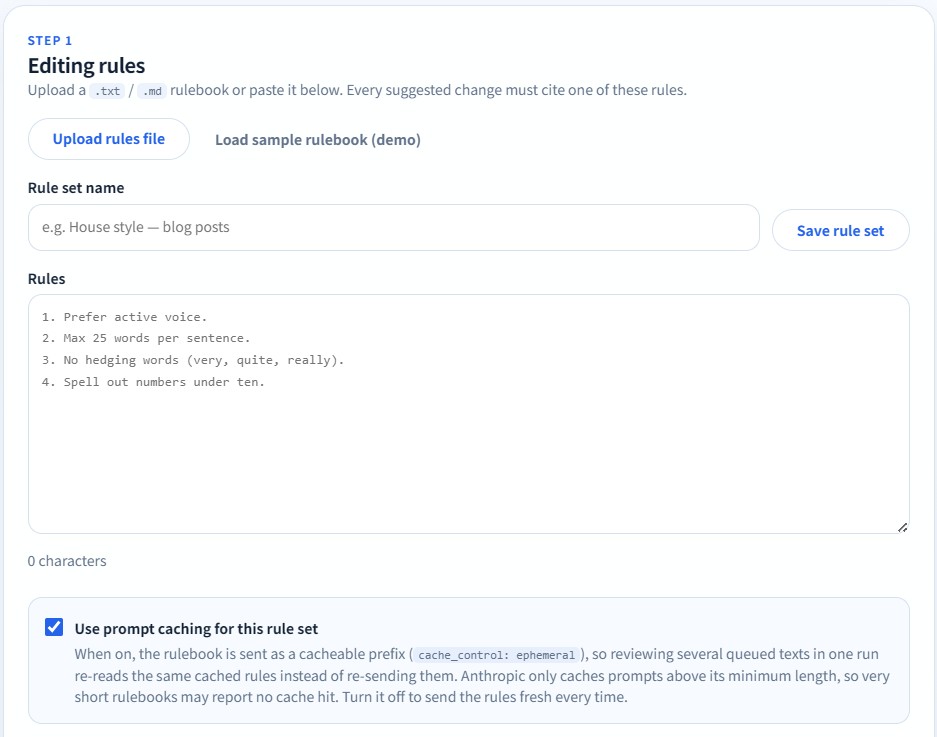
I decided to put Blue through its paces for the final round of upgrade requests. Using the Efficiency Upgrades prompt at the bottom of this article, Blue added several complex new app features at once. The layout of the original UI needed improvement. First, I requested the three input sections, Editing Rules, Draft to Review, and Redline Feedback, shift from multiple columns to a vertical stack. I also asked Blue to enable prompt caching for the Editing Rules ruleset, the ability to submit multiple text sets for editing, and a better organizational system for recent editing results. I purposefully left the organizational structure improvement request vague to test Blue’s prompt interpretation and creativity. Coding all three was a big ask, so I set Blue’s build quality to High quality.
The Results
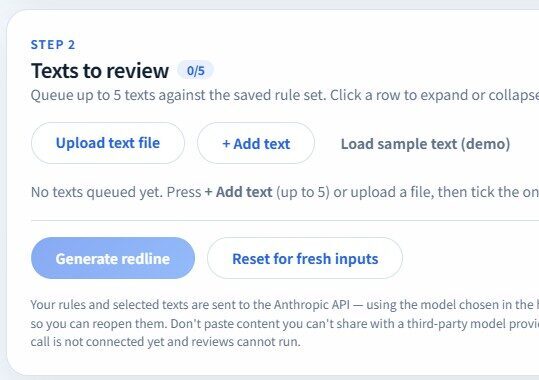
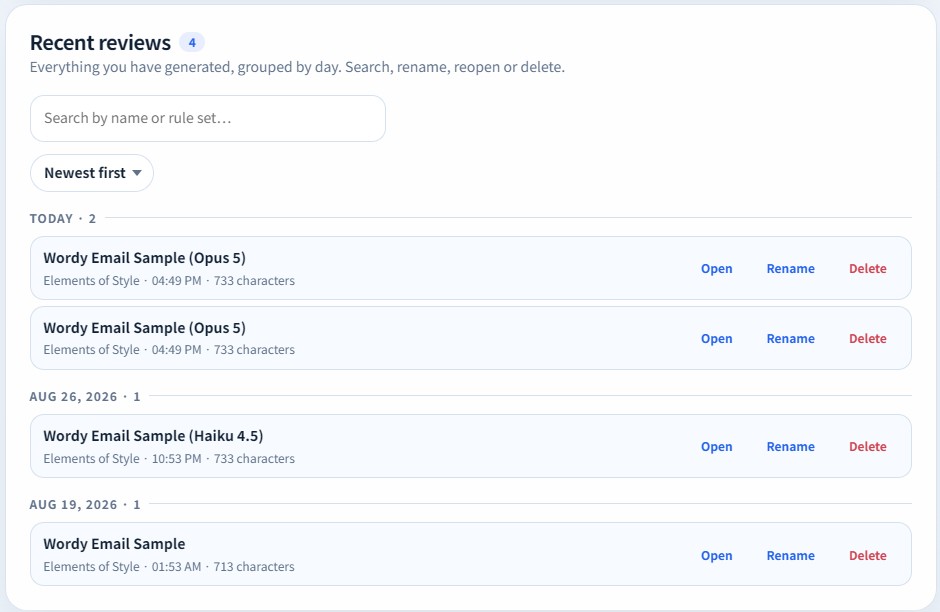
Completing all the upgrades simultaneously took nearly twenty minutes. At the ten-minute mark I grew nervous, thinking the request was too ambitious. I posted three screen captures of the fully upgraded app version below. To Blue’s credit, each upgrade request executed flawlessly. I even started laughing out loud in disbelief as I clicked and tested the new features. As someone wholly incapable of programming an app like this unassisted, I am beyond impressed. Blue’s creativity in its interpretation of the Recent reviews organizational structure upgrade was equally impressive. Blue even thoughtfully added a remove text feature for queued texts awaiting their redline review without specific instruction.
I’m unsure more words are necessary to expand upon Blue’s success in this build. From the base prompt, to performing a minor upgrade, debugging, and a major overhaul—Blue interpreted the prompts, completed the build, and deployed a working version of the app every single time.
For those readers interested in reconstructing this exact app, please reference the original prompts embedded in the text accordions below. For anyone else with big ideas but no programming experience, the results speak for themselves. Get to building with Blue!
Redline Editor Build Prompts
Open the text accordions for the Blue AI text prompts corresponding to the core build, debugging, and additional features. The parenthesis indicate which level of build quality Blue used.
Create an app that will call on stored Anthropic API Key. The purpose of this app is to allow users to upload a set of editing rules for a written text, for example, a web article. The app will then use the called LLM and apply the uploaded rules to provide editing feedback to the user on the written material in a redline format. Redline format means the output will show the user’s original sentences and suggested edits, highlighting changes sourced from the reference rules so the user can improve their writing skills.
Change the Model connected section in the upper-right displaying claude-sonnet-4-5 to a drop-down where the user can select between Opus 5, Sonnet 5, or Haiku 4.5 only. Ensure that whenever a model is selected, the Redline Editor calls that specific model from Claude. Do not include options to call older models like Opus 4.8, Opus 4.7, or Sonnet 4.5, as examples.
Please improve this app based on my feedback: Not working / Anthropic API error 400: ‘temperature’ is deprecated for this model.
Improve the layout of the Redline Editor app by stacking Editing Rules, Draft to Review, and Redline Feedback sections vertically for a cleaner look instead of its current format. Enable the use of prompt caching by the editor by allowing the user to save a ruleset, then store up to five texts before clicking Generate Redline to call the API and perform the edits.
The five text blocks should collapse or expand when clicked for easier review and be accompanied by a check box so the user can select which of the texts will get called for editing under the cached ruleset. Provide an option for the user to decide if they want to use prompt caching for ruleset or not so they have the choice.
Put a better file organizational system for recent reviews so the user can more easily see all their recent edits instead of only a few. Allow renaming of recent reviews. Add a button next to Generate Redline that resets the app for fresh inputs rather than rely on refreshing the app manually.