
Introduction
In our previous article, Gift Shopping with monoca 2, we talked about how many of us are victims of modern consumerism. Every year companies come up with reasons for new sales periods, start existing sales earlier, or extend existing sales. With social media permeating nearly every facet of our lives, advertisements fly in from every direction. Facebook, Instagram, TikTok, in your Gmail account, and in the margins of websites—all places for ads, all seeking engagement clicks. Woefully, I must admit, I’m a sucker for a deal. The popular outdoor retailer Backcountry has fleeced me for many-a-dollar over the years by flaunting prices at 60, 70, or even 85% off retail. Cha-ching! I made the purchase.
Other than the obvious pains in my wallet, the other fallout of my consumerist victimhood is a closet full of clothes I hardly wear. On several occasions my wife and I discussed how to solve this problem. The consensus was to track our use of clothing items. If an article of clothing remains unworn for a year, the rationale for keeping it must be well-founded. If an article of clothing remains unworn for two years, it’s time to sell it for a bargain to see it gone or donate it. A simple system, right? How to track each piece’s use became another issue entirely.
After much consideration, monoca 2 became an obvious choice. The app lends itself particularly well to solving the problem of an overfull closet through its ease of customization. The ability to quickly attach photos from your device’s camera roll or snap them from within monoca 2 only adds to the convenience. In this article we’ll cover the system I developed and, with luck, can provide an update in a future article. Keep in mind, this system is customizable for most any kind of object. If you’re not a clothing enthusiast like me, find what you have an excess of and apply it to that category. Let’s get into it!
Previous Articles
In past articles, we’ve looked at how monoca 2 can be used for everyday life, tracking grocery prices, and even organizing minis for tabletop gaming. Each of those examples showed how the app’s customizable categories and fields make it flexible for any kind of collection.
Using monoca 2 in Everyday Life
Where to Download
The fully unlocked version of monoca 2 comes with unlimited item creation, 10 shared groups, no ads, and higher resolution icons and images, is available for a single, lifetime unlock payment of $9.99. Share your device’s trial code with a friend to give them a 25% discount. Share each other’s codes and you can both receive a discount.
App Store: Download for iPhone/iPad
Google Play: Download for Android
Web(Beta): https://monoca2.web.app/
Making the ‘Wardrobe’ Category
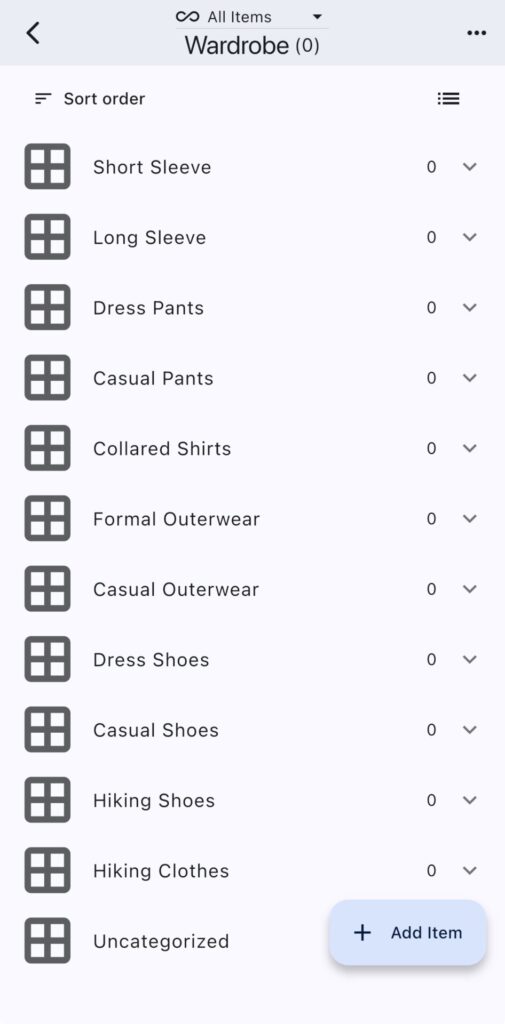
As with most any other monoca 2 focused article, our first step is to create the primary category, then populate the subcategories. At my primary employer’s office, the dress code leans more towards business formal. A tie is not necessary, but I wear collared dress shirts every day. For that reason, I divided several of the categories into formal and casual. Below is the final subcategory list:
- Short Sleeve
- Long Sleeve
- Dress Pants
- Casual Pants
- Collared Shirts
- Formal Outerwear
- Casual Outerwear
- Dress Shoes
- Casual Shoes
- Hiking Shoes
- Hiking Clothes
- Uncategorized
Part of my ongoing strategy will be to add to these categories every day, if possible. In several previous articles covering monoca 2 we mentioned that organizing does not come easily to some. I fully recognize that the time investment required to fill a category is likely an inhibiting factor for prospective monoca 2 users. Adding to the categories little by little can reduce any potential app-fatigue.

The Category Fields
A best practice in building category subfields involves listing the most critical information first. For me, in this sample wardrobe category, that information was the last time (date) I wore a particular article of clothing. Other key pieces of information included the size and material. Material is important because it indicates the difficulty in laundering a particular piece. Also, I’ve recently found myself moving away from synthetic materials like polyester, nylon, and rayon, for natural fibers like cotton or wool.
- Last Worn (Date)
- Size (Text)
- Material (Text)
- Stored at (Location)
- Purchased price (Number)
- Purchased at (Location)
- Purchased on (Date)
- Photo (Image)
- Note (Text – Multiline)
- Ease of Styling (Score 1-5)
A photo of the clothing is arguably the second most important piece of information—and one I want to see quickly. I did not list it at the top in order to make the spacing of the item entry flow better. Notes can be used for general information, laundering instructions such as dry clean only, or hand wash only, or other useful tips. I renamed the Score 1-5 field to Ease of Styling. In clothes, it happens all too often. I’ve purchased many pieces appreciating the color in the moment only to realize later how difficult the it is to match with anything. I’ll likely add low scoring ‘Ease of Styling’ pieces to my ‘sell’ or ‘donation’ lists in addition to infrequently worn pieces.
Ask any enthusiast and they’ll tell you, invest in a handful of timeless, high-quality pieces you always reach for rather than a closet full of junk and you’ll be much happier.
As they say, “buy once cry once”.
Conclusion
I’m excited about this ‘Wardrobe’ Category and the insights it will bring. And it was awesome sharing with all of you readers. While I don’t think I’ll become a minimalist anytime soon and try to reduce my owned objects down to 100 or less, decluttering brings peace of mind. I encourage you to find something you’ve overpurchased or over collected and try to reduce it down to the fewest, most frequently used objects.
Having already added a few sweaters to the donation pile, I’m already feeling less burdened. As always, please leave a comment below with any requests for any future article topics. Catch you next time!
Where to Download
The fully unlocked version of monoca 2 comes with unlimited item creation, 10 shared groups, no ads, and higher resolution icons and images, is available for a single, lifetime unlock payment of $9.99. Share your device’s trial code with a friend to give them a 25% discount. Share each other’s codes and you can both receive a discount.
App Store: Download for iPhone/iPad
Google Play: Download for Android
Web(Beta): https://monoca2.web.app/
Leave a Reply