
Introduction
Budgets are a part of life. Even countries must operate under one. We as individuals or as a part of a company are no exception. With so many different large language models, pricing plans, and tiers on the open market, choosing the right one presents challenges. What’s more, interacting with an LLM on an individual plan versus calling one via an API are both priced and constrained differently. As I explored Blue AI’s app-making capabilities, it quickly became obvious I needed to leverage an outside LLM if I wanted to deepen the complexity of my generated apps. As an amateur, the notion of researching and selecting which model to choose from intimidated me yet understanding it felt so essential to progressing in this field.
This article covers standard pricing models and provides detailed explanations of API plans, tokenization, and token use. Future articles will detail building apps with Blue AI and calling LLM APIs for assistance. For now, we’ll focus on tokens and tokenization. Let’s get into it!
Sola’s Blue AI Pricing
The free version of Blue AI provides users 2 high-level builds and 12 standard builds weekly. For new users looking to better understand Blue as a platform, the Starter Plan (Free) is more than generous. Users receive 2x the AI Build quota in the first 7 days, and it even allows the use of API keys and backups. Visit Blue AI’s Pricing page for more information.
LLM Pricing Models
Unsurprisingly, the biggest names in the publicly available AI space use near identical pricing structures. Before the tier breakdowns, users first select between broader use categories:
- Individual
- Team / Enterprise
- API
While researching LLM platforms like Open AI’s GPT, Anthropic’ s Claude, and Grok by xAI (SpaceX), the pricing similarity stood out to me. Each platform has a free plan. I found each company’s data rich, yet minimalist website layout simplified comparing plans and features.
The tier up from the free version contains meaningful enhancements, namely in speed, accuracy, and length of responses (output). This second tier often ranges from as little as $10 a month to $30 a month. One thing to note: many pricing pages default to included discounts if users pay annually. Paying monthly will nearly always increase the initially displayed pricing.
The $$$ Tier
The final tier steps things up considerably in both functionality and price. Most top-tier non-commercial plan prices settled around $100 a month across all platforms. Session usage limits, however, felt difficult to understand. On paid plans, excessive interactions or overuse with the LLMs causes throttling. Power users might exhaust their access allotment to Claude’s flagship Fable 5 or Opus 4.8 and require shifting to an economy model like Haiku 4.5. One of Claude’s support articles on Usage Limit Best Practices is worth reading, and provides guidance on how to use LLMs, specifically Claude’s models, more efficiently. Becoming efficient with LLM interactions better allows users to maximize the value of their paid plan.

API Plan Pricing
While Individual and Business (including Enterprise) pricing felt easy enough to understand, API calling uses a complex tokenization system. Understanding the cost implications of calling on a LLM API and an app’s token burn rate felt like a critical app-development component.
What Are Tokens and What is Tokenization?
Tokens refer to chunks of broken-down words and characters. In my reading across many different websites and articles, including Open AI’s own Tokenizer site, one token generally corresponds to 4 characters of plain English text. Extrapolating that data provides a rough estimate of 100 tokens equals 75 words. While paragraphs can vary in length from 1-2 sentences or several pages in the context of a Charles Dickens classic, contextually short paragraph for blogs, web articles, and online content contain 75 words. Simply put—that’s not a lot of output content for burning 100 tokens.
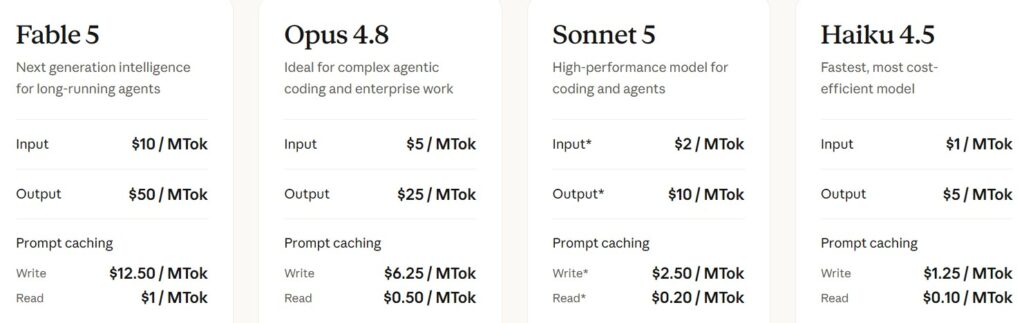
Look at the screenshot below for pricing on API calls for Claude’s models. The MTok nomenclature represents the cost per million tokens used for the LLM reading the user’s prompt—that’s Input; or providing a response prompt—that’s Output. Notice the price disparity between Input and Output.
Tokenization Sample Calculation
For the sake of this sample calculation, please assume we’re using Claude’s Opus 4.8 pricing as of July 23rd, 2026; the most recent instance I visited their site while writing this article. If an app you develop using Blue AI calls Opus 4.8 and burns 500 input tokens and 1000 output tokens, the cost breakdown looks like:
(500 tokens / 1,000,000 tokens * $5/MTok) + (1000 / 1,000,000 * $25/MTok) = $0.0025 + $0.025.
Now we convert the dollar amounts to cents by multiplying by 100.
($0.0025 * 100 cents) + ($0.025 * 100 cents) = 2.75 cents
While that seems reasonable for a handful of executions, if that same model function is called 10,000 in a month, that’s $275 in token expenses. Distributed across an enterprise where that same 500/1000 token input/output is used 100,000 times and the monthly API charge increased by a factor of ten to $2,750.
Why it Matters
As the author, I felt it necessary to explain in simple English what to many can be a confusing and intimidating subject. With Blue’s users ranging from university students all the way to developers at large enterprises, budgets also vary in in acceptability. Lacking direct ties to growth, even a $75M yearly revenue company might come unhinged at a $10,000 or $20,000 a month software bill from excessive API calls.
Blue AI’s ability to build apps capable of producing dynamic prompting with multiple input and output iterations by leveraging a LLM is nothing short of incredible. In high enough volumes, however, even basic prompting via an API could lead to hundreds or thousands of dollars in AI related expenses each month that have nothing to do with Sola or Blue AI’s capabilities. In fact, the very same LLM limitations discussed in this article are why Blue itself has subscription tiers and usage limits associated with those tiers. It all ties back to LLM usage rates.
Conclusion
While leveraging Sola’s Blue AI to build your next incredible app, it’s important to calculate API and other related expenses. This holds especially true if users are employees of a company planning on releasing what they build with Blue for public use. I think it’s sage advice to work with Blue purposefully. Explore, design, and leverage the platform to expand your own creativity in app design, but remember to be purposeful and be efficient in the use of outside resources. Everything’s great until the invoice arrives. Until next time!